# 📌 2. Configuring Parameters for main stack
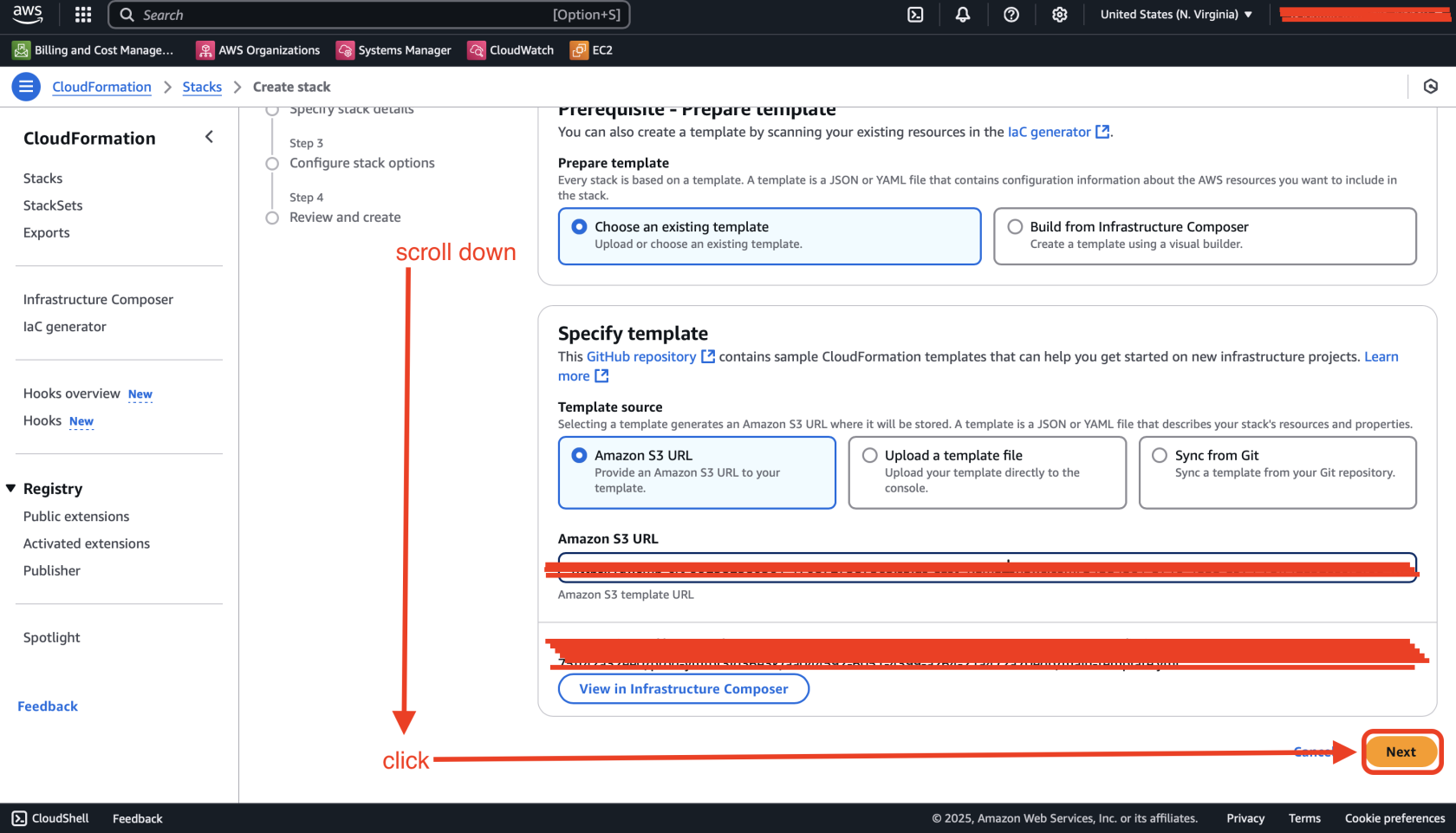
### **Step 1. Prerequisite - Prepare template**
We did the first step previously, when subscribed for the product in [AWS Marketplace - Setup Guide](https://wiki.devsecopsinc.io/books/install-bookstack-wiki/page/1-aws-marketplace-setup-guide#bkmrk-2%EF%B8%8F%E2%83%A3-deployment-via-c "Deployment via CloudFormation"), so move forward to the next step.
[](https://wiki.devsecopsinc.io/uploads/images/gallery/2025-04/2-1-deploy.png "step-1.png")
### **Step 2. Specify stack details**
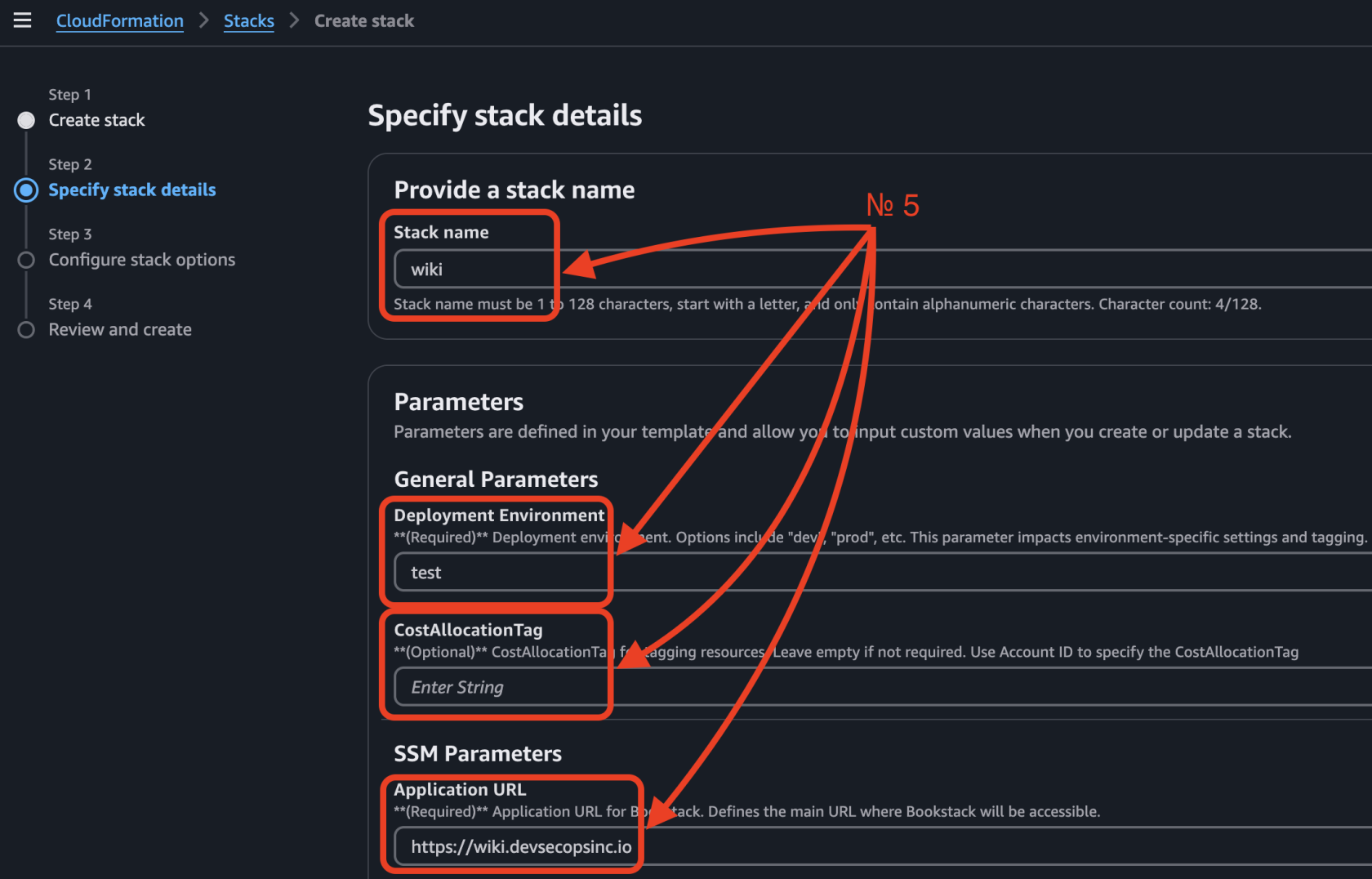
Here, you need to fill in the `Stack name`. You can choose **any name** for your stack, but we recommend using a structured format like: `bookstack` (e.g., `wiki`, `docs`, etc.).
For this guide, we will use **wiki** as an example.
[](https://wiki.devsecopsinc.io/uploads/images/gallery/2025-03/4-step-2-name.jpeg "4-step-2-name.jpeg")
There are **21 parameters,** some of which are predefined. You don’t need to fill in all of them — just focus on the **required** and **empty fields**. For additional guidance, refer to the help description provided under each parameter.
[](https://wiki.devsecopsinc.io/uploads/images/gallery/2025-03/4-step-2-parameters.png "4-step-2-parameters.png")
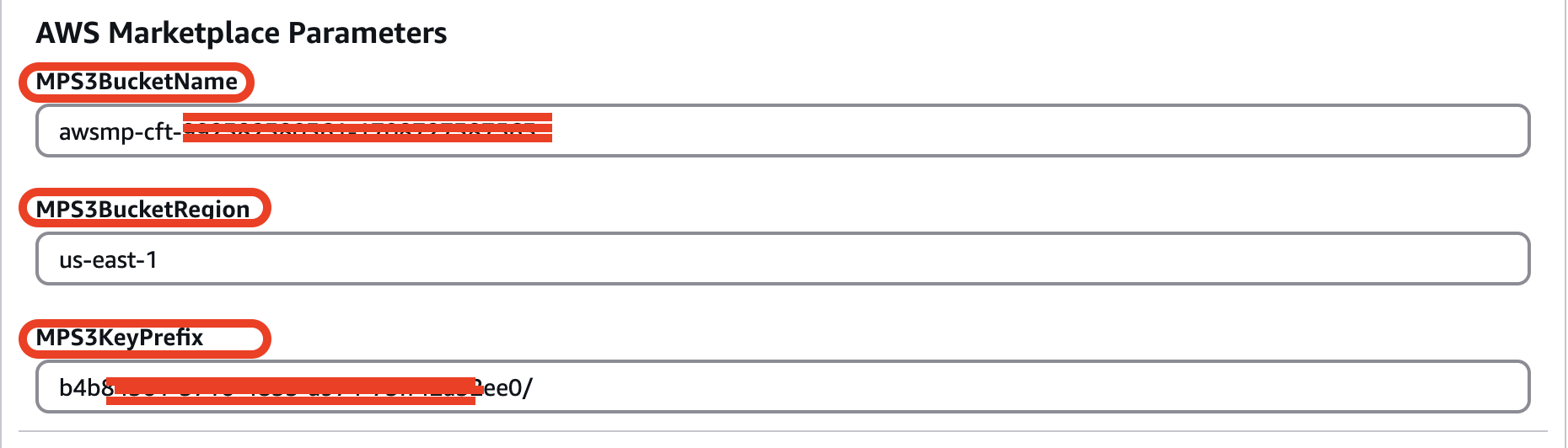
**⚠ Important Notice!**: There are three additional parameters for **AWS Marketplace Store**. They are starting from prefixes as "**MPS"**, so you shouldn't modify them - otherwise, CloudFormation will fail with an error.
[](https://wiki.devsecopsinc.io/uploads/images/gallery/2025-04/4-step-2-mps-parameters-new.png "4-step-2-mps-parameters-new.png")
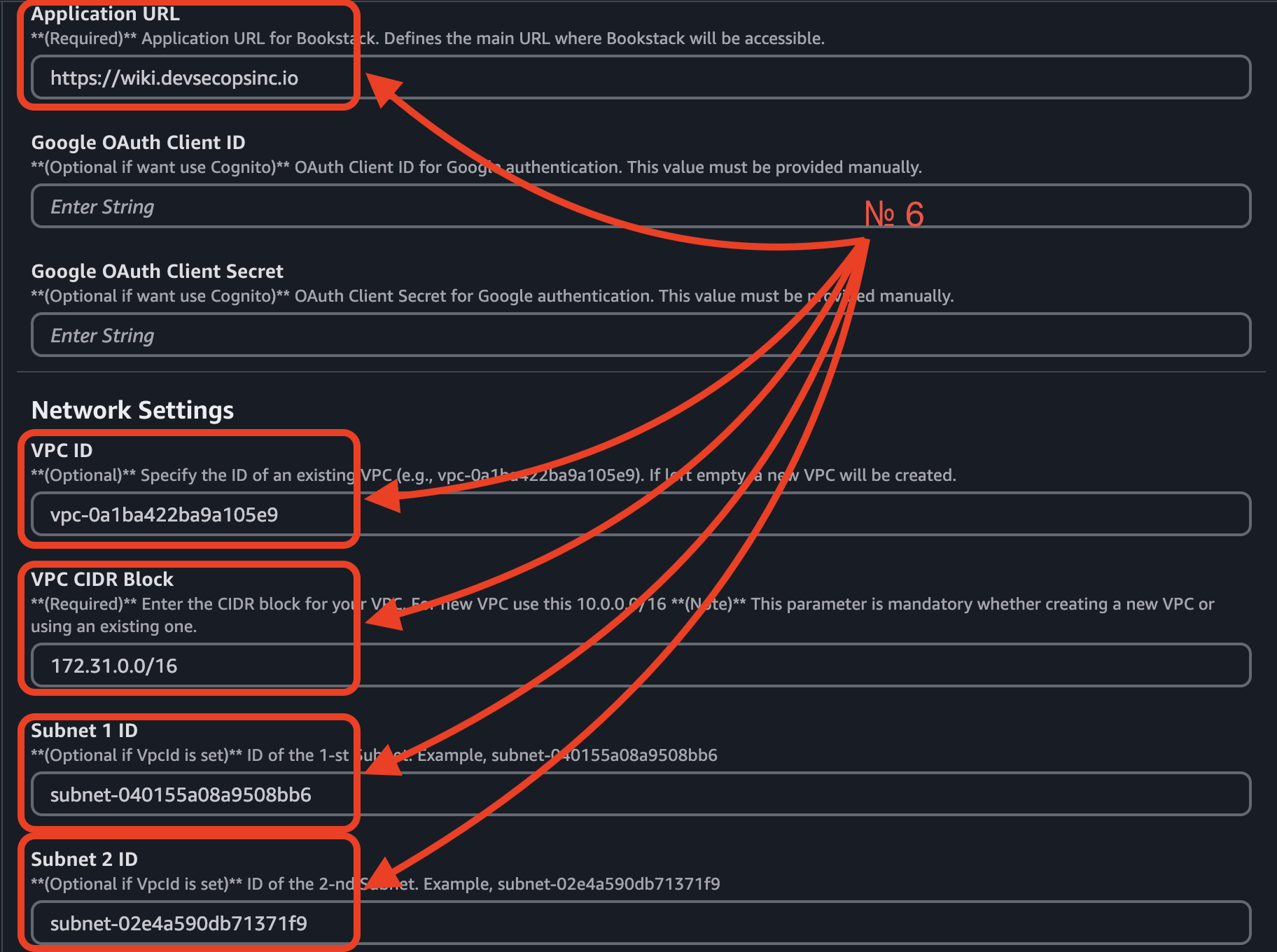
##### **7 Required Parameters:**
1\. **Deployment** **Environment** – Specify the environment (e.g., `dev`, `prod`).
2\. For **optional** **parameters**, you can leave the string blank, as we did with `CostAllocationTag`, `GoogleClientId`, `GoogleClientSecret`.
3\. **AppURL** – Define the URL where BookStack will be accessible.
4\. **VPC** **ID** – Enter the ID of an existing VPC.
5\. **VPC** **CIDR** **block** – Provide the CIDR block of your existing VPC**.**
6\. **Subnet** **IDs** – Enter the IDs of your existing subnets (e.g., `Subnet 1 ID`, `Subnet 2 ID`).
[](https://wiki.devsecopsinc.io/uploads/images/gallery/2025-03/4-2-step-2-parameters.png "4-2-step-2-parameters.png")
**⚠ Important Notice!**: If you want to create new VPC, you should fill ONLY the `VPC CIDR Block`.
[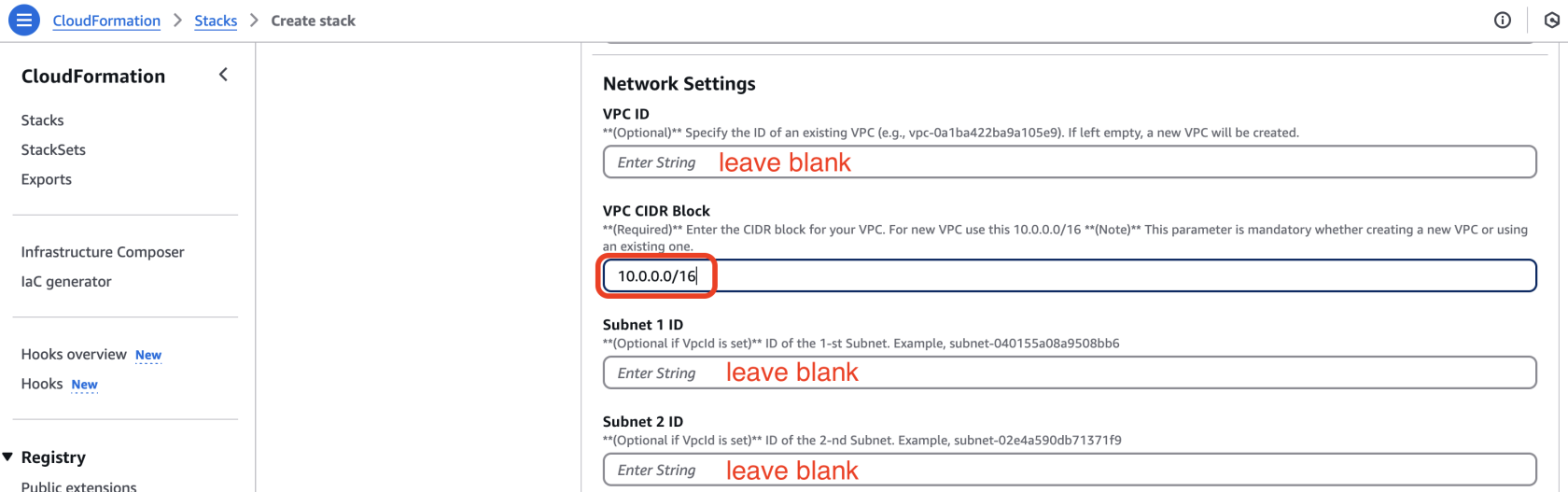](https://wiki.devsecopsinc.io/uploads/images/gallery/2025-04/4-2-step-2-parameters-addition.png "4-2-step-2-parameters-addition.png")
7\. **EnableUserSignUp**, **MultipleAuthMethods** - by default set to false for best security practices.
[](https://wiki.devsecopsinc.io/uploads/images/gallery/2025-03/cognito-params.jpeg "cognito-params.jpeg")
8\. **SSL Certificate ARN** – Provide the ARN of your SSL Certificate for the ALB. (*If you don’t have one, you must create it*.)
[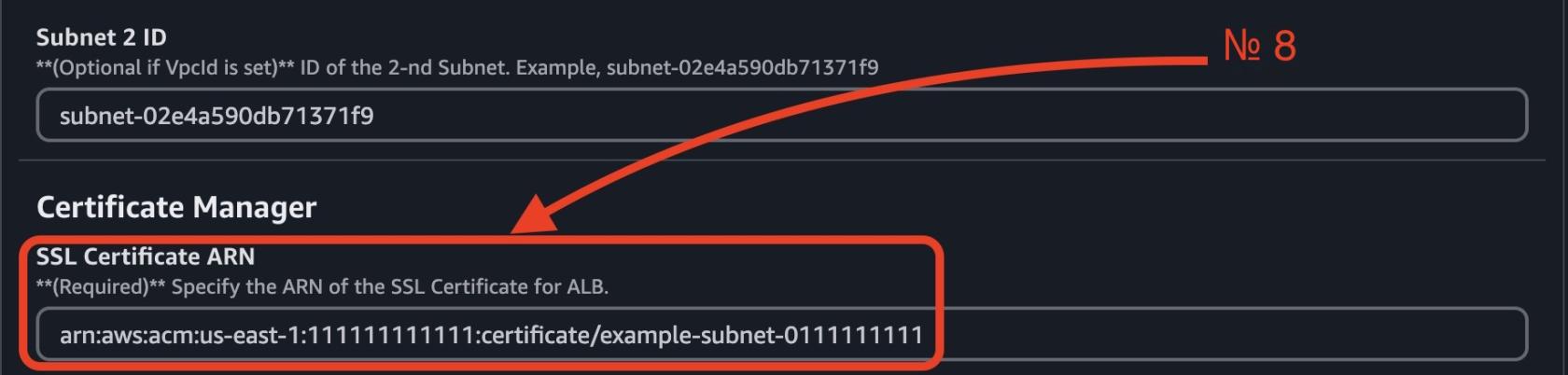](https://wiki.devsecopsinc.io/uploads/images/gallery/2025-03/4-3-step-2-parameters.jpeg "4-3-step-2-parameters.jpeg")
**⚠ Important Notice!**: There is one required parameter for **EC2AMI**. Its value is set to "**`/aws/service/marketplace/prod-ymfbr3id36e3k/version-v1.0-bookstack-v24.05.4`"**, so you shouldn't modify it - otherwise, CloudFormation will fail with an error.
[](https://wiki.devsecopsinc.io/uploads/images/gallery/2025-04/4-3-step-2-ec2parameters-new.png "4-3-step-2-ec2parameters-new.png")
##### **Override Optional Parameters**
Some parameters have predefined default values. You can **modify** them as needed or **leave them unchanged**:
• **EC2 instance type** (`t4g.small` is the default and is recommended for small environments).
• **RDS DB instance type** (`db.t4g.small` is the default).
• **RDS storage size** (`20 GB` by default).
• **Multi-AZ deployment** (set to `false` for cost efficiency).
• **Enable/Disable RDS backups**.
• **Enable/Disable RDS deletion protection**. **⚠ Important Notice!**: **If** this **parameter** is **enabled**, **you** **will** **not** **be able to delete the stack**. To proceed with deletion, go to `AWS Console` → `Amazon RDS` → `Databases`, select your database, click **Modify**, and uncheck "**Enable deletion protection**" for `bookstack-dev-rds`. After this, you can delete the main stack in CloudFormation.
• **Schedule backup rules**.
• **Schedule backup deletion**.
### **Step 3. Configure stack options**
Scroll to the bottom, check both checkboxes in the Capabilities field, and click the Next button.
[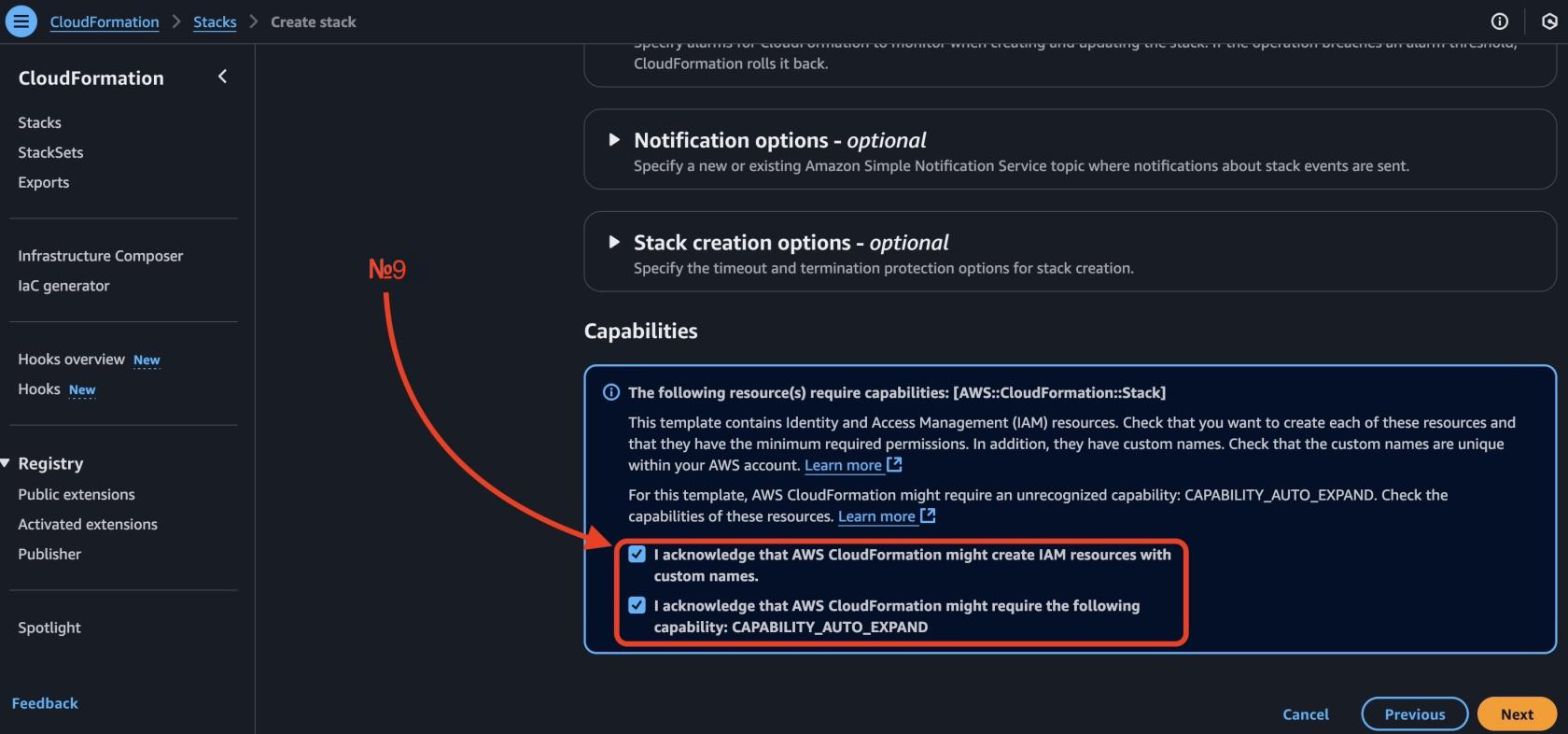](https://wiki.devsecopsinc.io/uploads/images/gallery/2025-03/5-step-3-capabilities-2.jpeg "5-step-3-capabilities-2.jpeg")
### **Step 4. Review and create**
Scroll to the bottom and click the **Submit** button.
[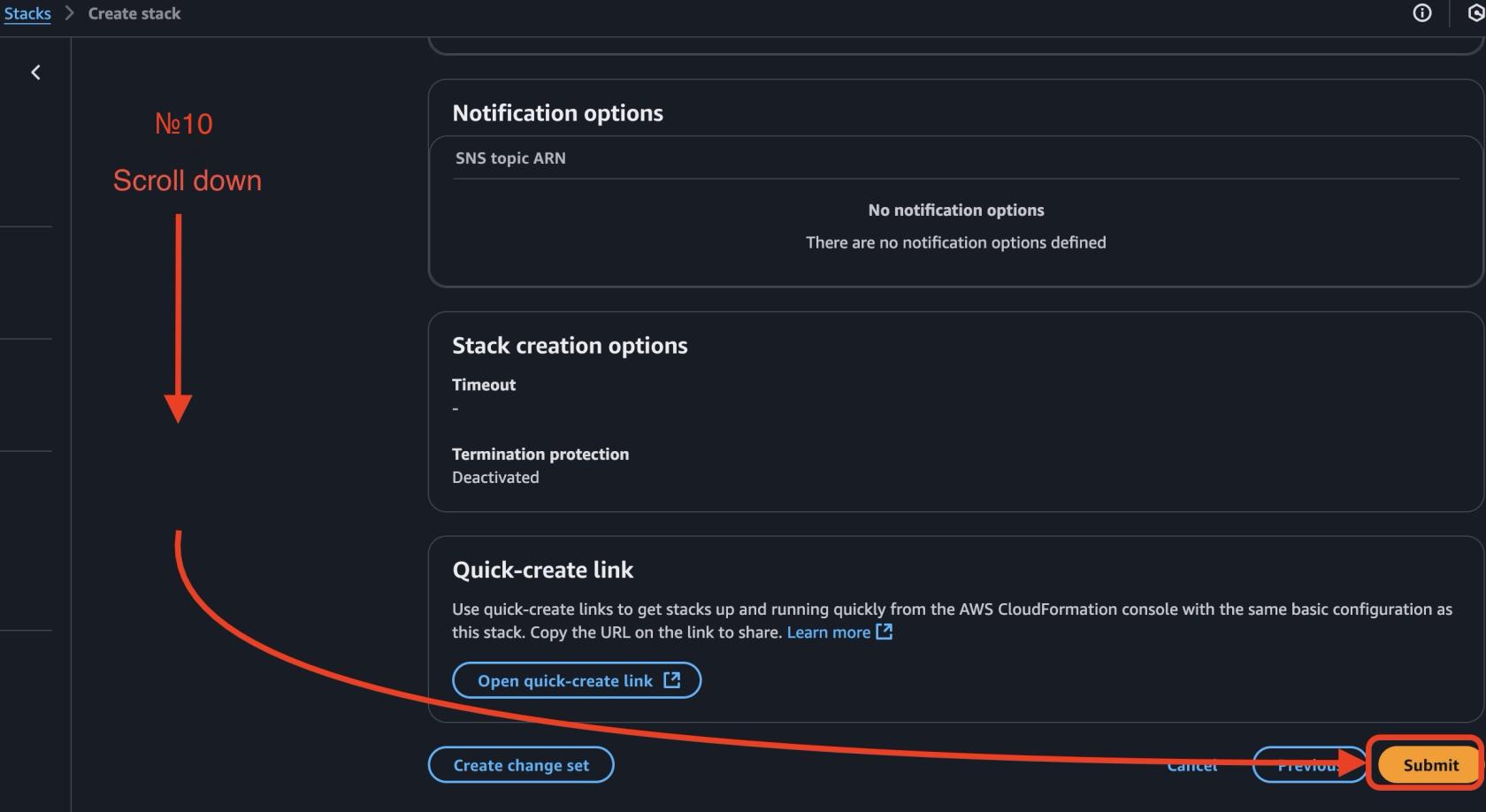](https://wiki.devsecopsinc.io/uploads/images/gallery/2025-03/6-step-4-submit.jpeg "6-step-4-submit.jpeg")
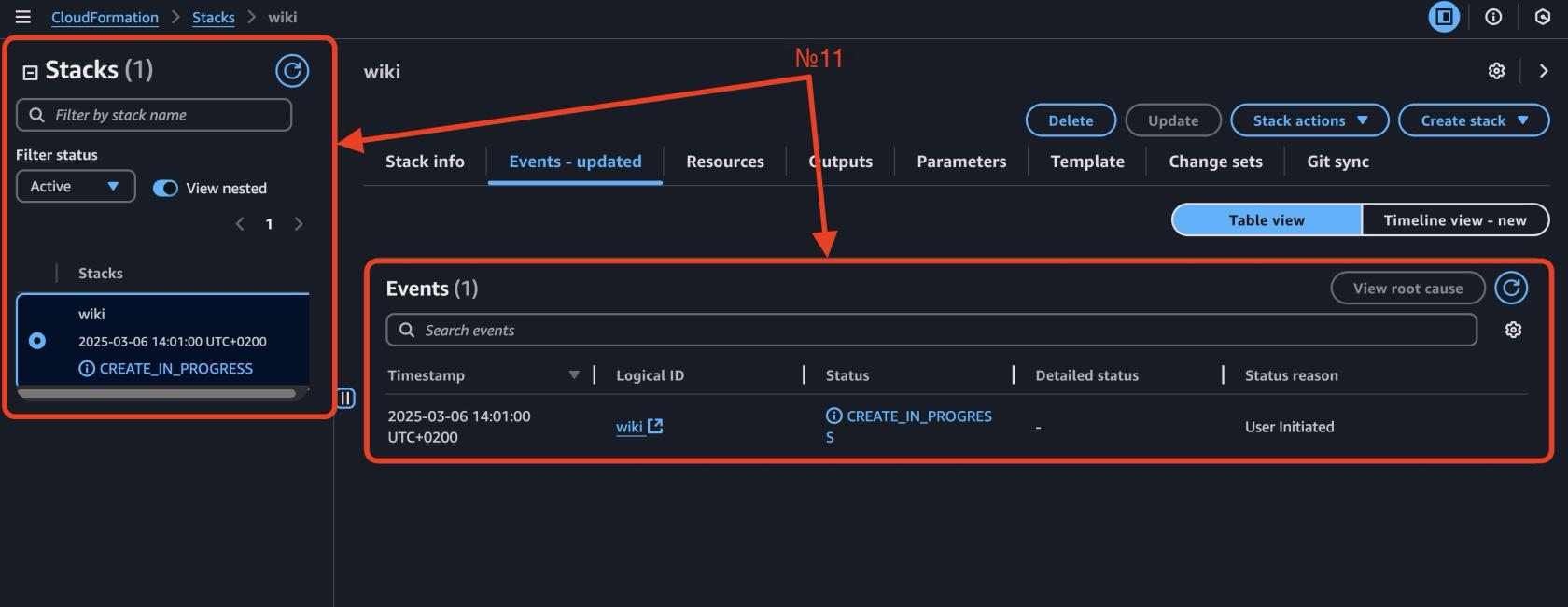
Now you can see how your environment is being deployed.
[](https://wiki.devsecopsinc.io/uploads/images/gallery/2025-03/7-step-4-deploying.jpeg "7-step-4-deploying.jpeg")
### **Follow these simple steps to access your product:**
#### **1️⃣ Retrieving the Access URL**
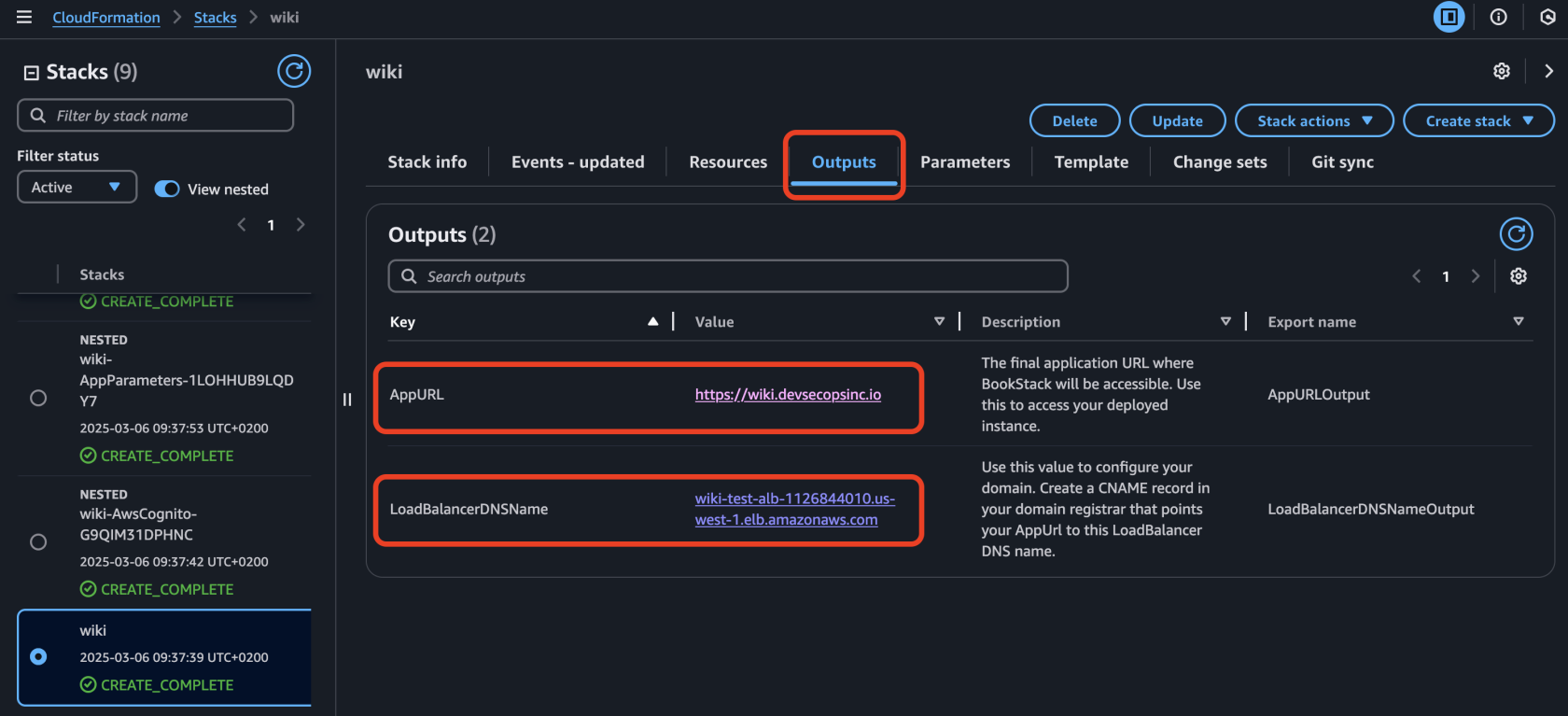
1\. After successful deployment, your product will be available at a generated URL, which can be found in the `bookstack-$Environment-main` stack under the **Outputs** section, **key** `LoadBalancerDNSName`, **key** `AppURL`.
2\. In your domain registrar, create a **CNAME** **record** for `AppURL`, pointing to the generated `LoadBalancerDNSName`.
3\. Open **AppURL** in your browser and enjoy!
[](https://wiki.devsecopsinc.io/uploads/images/gallery/2025-03/7-outputs.png "7-outputs.png")
#### **2️⃣ Accessing BookStack**
1\. Open **AppURL** in your browser.
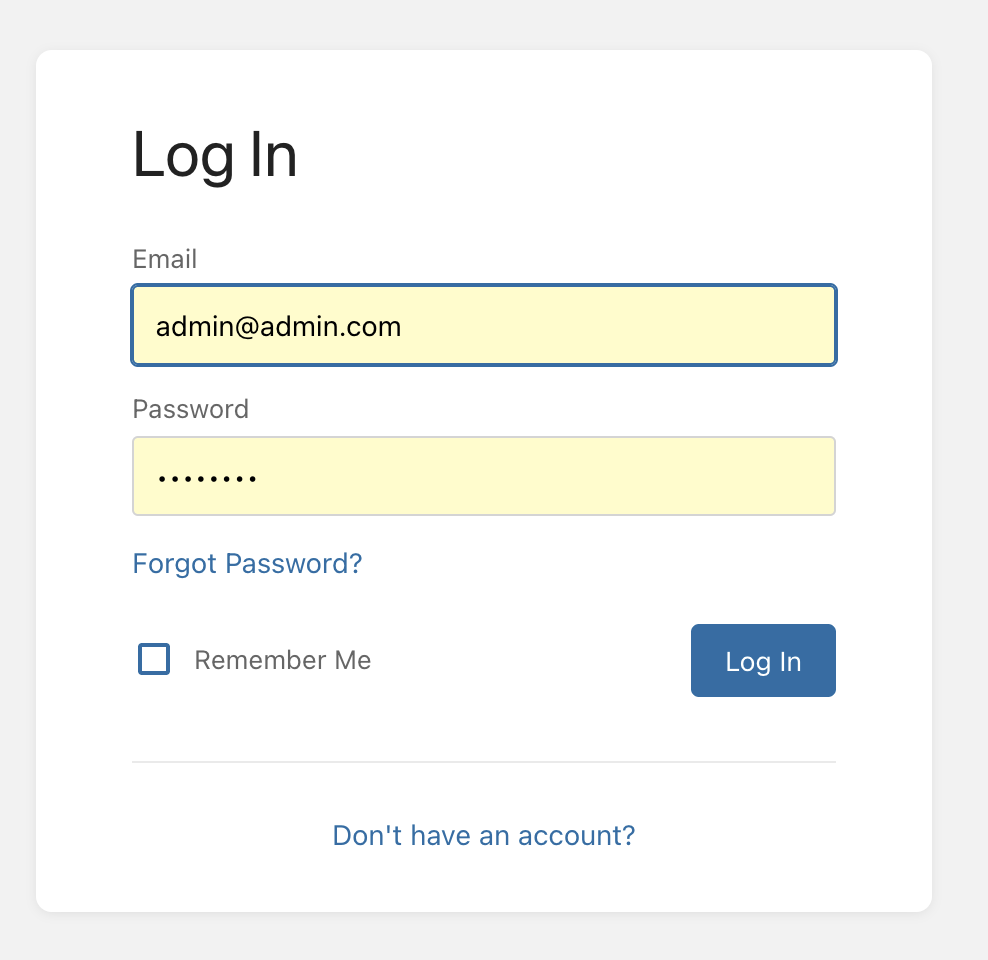
2\. Log in using the **default credentials**:
• **Username:** `admin@admin.com`
• **Password:** `password`
3. **Change your password immediately!** You can do this under **Profile → Settings**.
[](https://wiki.devsecopsinc.io/uploads/images/gallery/2025-03/8-login.png "8-login.png")
##### **Additional Information**
✅ **Application logs** are available in **CloudWatch Logs**.
✅ **Data is stored in RDS**, while Bookstack files are stored on Amazon **EFS**.
✅ **Deletion**: If needed, delete the main CloudFormation Stack to remove all associated resources automatically.
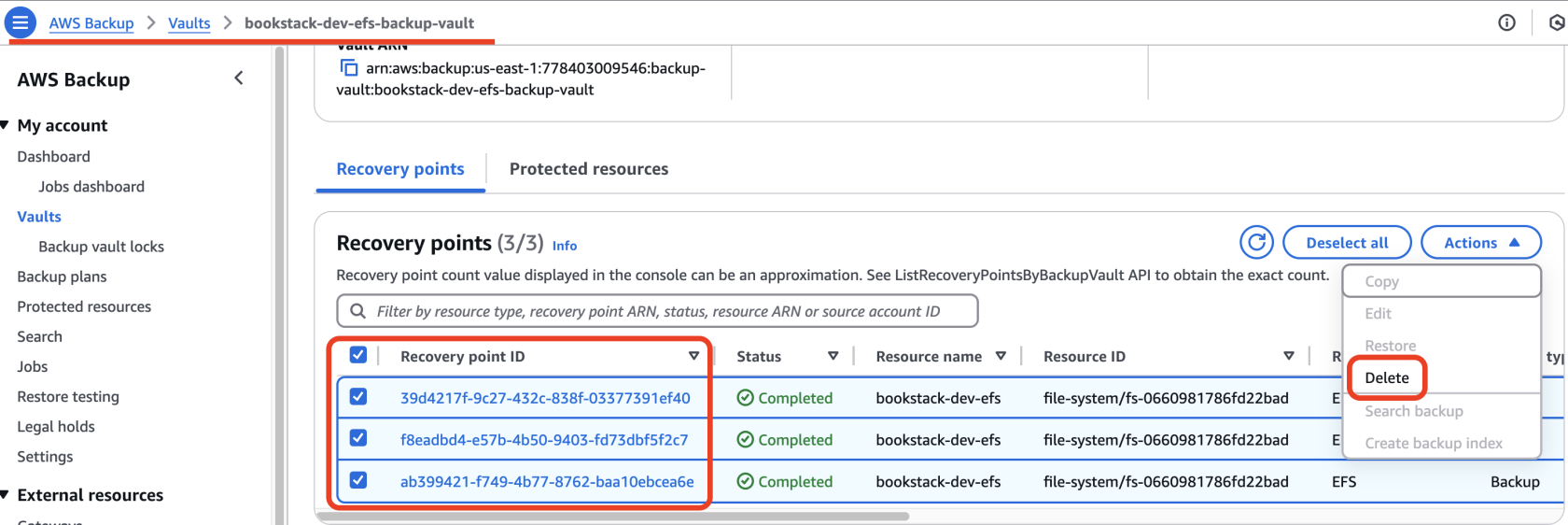
**⚠ Important Notice!** Before proceeding, navigate to **AWS Backup → Vaults → your-backup-vault-name → Recovery Points**. Select all recovery points, click the **Actions** button, and choose **Delete**. This will remove all **EFS backups**.
**Otherwise, deleting the CloudFormation stack will result in an error**.[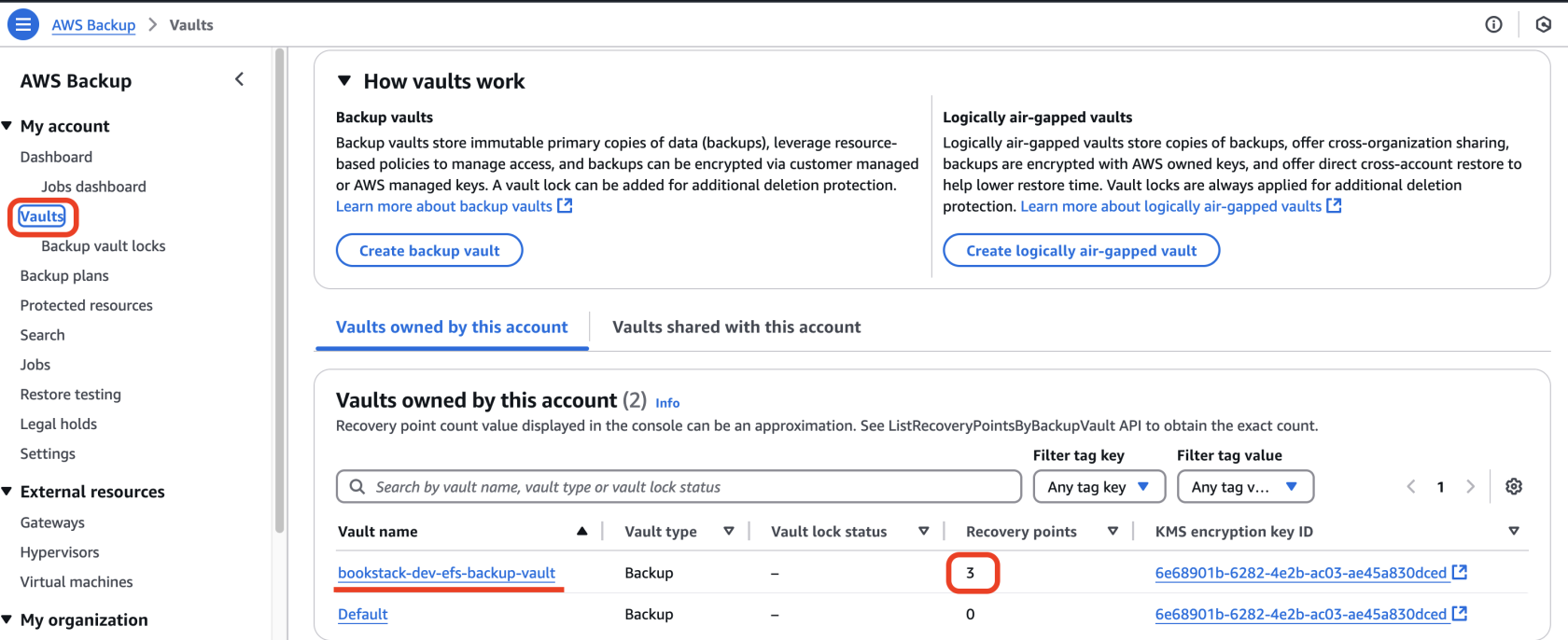](https://wiki.devsecopsinc.io/uploads/images/gallery/2025-03/bookstack-aws-backup.png "bookstack-aws-backup.png")
[](https://wiki.devsecopsinc.io/uploads/images/gallery/2025-03/vault-recovery-points.png "vault-recovery-points.png")
###
### ℹ️ **Additional Information:**
> Some minor issues may occur during the initial launch, which are known and documented. Please visit the [BookStack Bugs and Known Issues](https://wiki.devsecopsinc.io/books/bookstack-known-issues) section for more information.